Code Breaker Challenge 2025 Task 2: The Hunt Continues
Series: Code Breaker Challenge 2025
Writeup
I’m not gonna lie to you, this one had me stumped for quite a few days, but as per the usual with these things the answer was kinda in my face if I just had dug a little deeper. So let’s go ahead and dig into CBC Task 2.
 Okay, so the disk image we were looking at last task definitely had some malware installed on the “endpoint” and that malware was generating some network traffic. Luckily for us a network IDS picked it up and saved the traffic off to a pcap for us to take a look at.
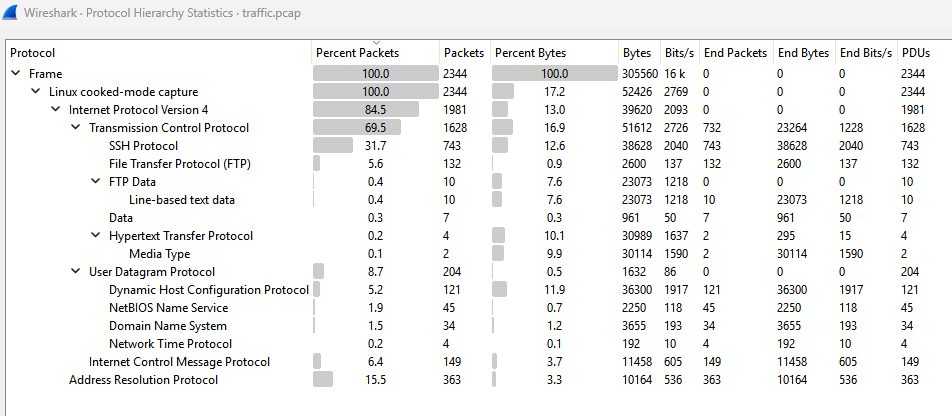 Okay so I’m gonna go through this kinda quick to be honest. A lot of malware will typically use HTTP or DNS for C2 communications, but as you can see there is very little of that traffic present in this pcap. And to be frank, there is not a lot of blatant “malware looking traffic” in this pcap, in fact I don’t even know if the traffic from the compromised node is malicious traffic. We’ll get to that in a minute though, we know the compromised device is a router for a couple reasons. We gathered from the first task it probably was just based off of it being Alpine Linux and then also here we need to find multiple IP’s associated with the device. Finally, nation-states love compromising network appliances so this is just all very in line with NSA type thinking. Okay with all that being said how did I really get this all figured out? Honestly, trial and error. If you look down at my notes, which I’m keeping in this post, you’ll see all the IPs in this pcap and notice there’s about 6 IPs that definitely look like default gateways and a few of them are probably going to be our addresses.
Now the other thing here to consider is the use of unencrypted FTP as that is definitely concerning and when we take a peak at that…
Okay so I’m gonna go through this kinda quick to be honest. A lot of malware will typically use HTTP or DNS for C2 communications, but as you can see there is very little of that traffic present in this pcap. And to be frank, there is not a lot of blatant “malware looking traffic” in this pcap, in fact I don’t even know if the traffic from the compromised node is malicious traffic. We’ll get to that in a minute though, we know the compromised device is a router for a couple reasons. We gathered from the first task it probably was just based off of it being Alpine Linux and then also here we need to find multiple IP’s associated with the device. Finally, nation-states love compromising network appliances so this is just all very in line with NSA type thinking. Okay with all that being said how did I really get this all figured out? Honestly, trial and error. If you look down at my notes, which I’m keeping in this post, you’ll see all the IPs in this pcap and notice there’s about 6 IPs that definitely look like default gateways and a few of them are probably going to be our addresses.
Now the other thing here to consider is the use of unencrypted FTP as that is definitely concerning and when we take a peak at that…
 We’ll see 3 different router configs stored on an FTP server. Now the trial and error part was just trying the different addresses in the configs because I swear there is not anything inherently malicious about the comms of any of these IPs. It’s probably just a skill issue, but idk I feel like I just didn’t see anything. Any how, the malicious config in question ended up being this guy:
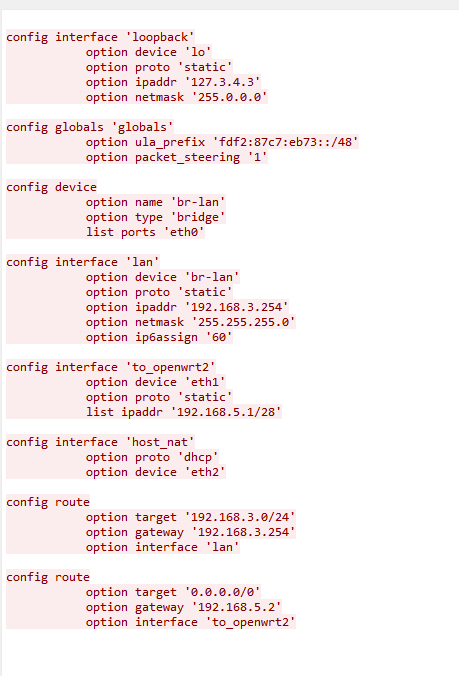 The IPs in question were the 3.254 address, the 5.1 address and the address configured as the loopback address. And that was Task 2, like I said, pretty rough, I was being dumb and didn’t actually look in the config files for the longest time and as the loopbacks don’t appear in the traffic I didn’t think about that as one and so got stuck for a hot minute. It’s done now though so onto the next one!
Alright time for some Wireshark fun.
Notes
Anonymous FTP Login
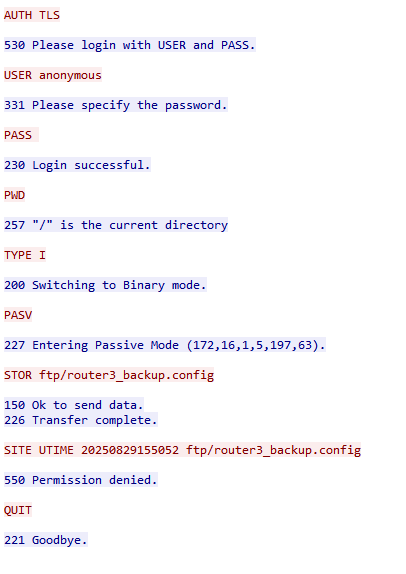 192.168.5.1 -> 172.16.1.5
Pretty confident 172.16.1.5 is one
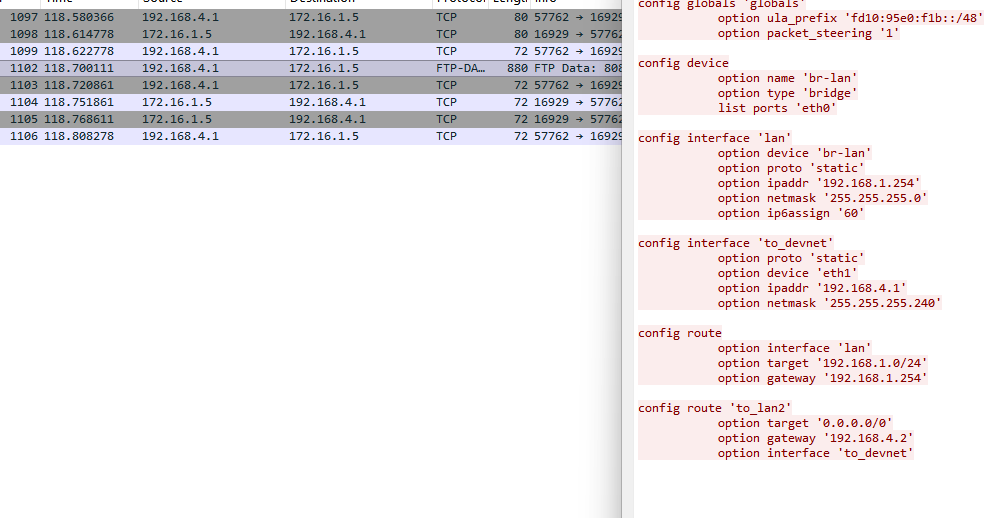 Here we see potential compromised IP retrieving a router config?
Working Theory compromised node is a router. Between the challenge needing multiple IPs and nation states loving compromising network nodes
Different Networks (and IPs)
45.83.234.123: NTP server
52.123.128.14: HTTPS server, reached out to by 192.168.2.50 again
52.123.129.14: HTTPS server, reached out to by 192.168.2.50 again
’’’ 52.123.251.5 ’’’ 52.123.251.45 52.123.251.47 52.123.251.50: Only receives fragmented HTTP from 192.168.2.50. Beaconing? ’’’ 52.123.251.72 Okay every IP is this subnet just receives fragmented HTTP from 192.168.2.50 not right?? Not necessarily all same device I guess
’’’ 91.189.91.83: Ubuntu package repository? 192.168.1.86 downloaded .deb package from here
’’’ 104.208.16.88: Another HTTP server reached out to by 192.168.2.50
’’’ 135.233.45.221: Another HTTP server reached out to by 192.168.2.50 ’’’ 135.233.45.223: Another HTTP server reached out to by 192.168.2.50
’’’ 135.234.160.244: Another HTTP server reached out to by 192.168.2.50 ’’’ 135.234.160.245: Another HTTP server reached out to by 192.168.2.50
172.16.1.5: FTP server almost for sure ’’’ 172.16.1.230: sshing into several different routers? One MAC/IP mapping. MAC: 00:0c:29:6b:81:d4 ’’’ 172.16.1.254
’’’ 172.178.240.162
’’’ 192.168.1.86: All this one does is download a .deb package (spice package) ’’’ 192.168.1.140: FTPs RFC.txt and then pings 192.168.2.50 ’’’ 192.168.1.254: Router for this network. Shares MAC with 192.168.4.1 and 192.168.1.140
’’’ 192.168.2.50: This one seems weird. We have NBNS traffic, lots of ARP, fragmented HTTP to a ton of different addresses and some FTP. Hmmm MAC: 00:0c:29:17:09:18 ’’’ 192.168.2.96: DNS’s default gateway ’’’ 192.168.2.254 Router for this subnet ssh’d into from 172.16.1.230
’’’ 192.168.3.89: All this does is get a pgp key from 203.0.113.108 and has no MAC. Hm ’’’ 192.168.3.184: Literally just DNS’s gateway 192.168.3.254: Router for this subnet ssh’d into from 172.16.1.230 and answered DNS from 192.168.3.184
’’’ 192.168.4.1: grabs router 1 config from FTP server. Shares MAC with 192.168.1.254 and 192.168.1.140
192.168.5.1: Downloads router config 3 from FTP server and gets pinged by 192.168.2.50. Shares MAC with 192.168.3.254
’’’ 192.168.46.2: DNS server for subnet? ’’’ 192.168.46.133: Makes DNS queries, DHCP request and syncs NTP? ’’’ 192.168.46.254: DHCP/Gateway for subnet?
’’’ 203.0.113.108: Shares a pgp key with 192.168.3.89?? Mmmmm
’’’ 216.31.17.12: NTP
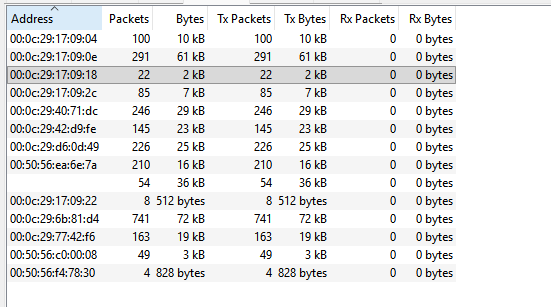
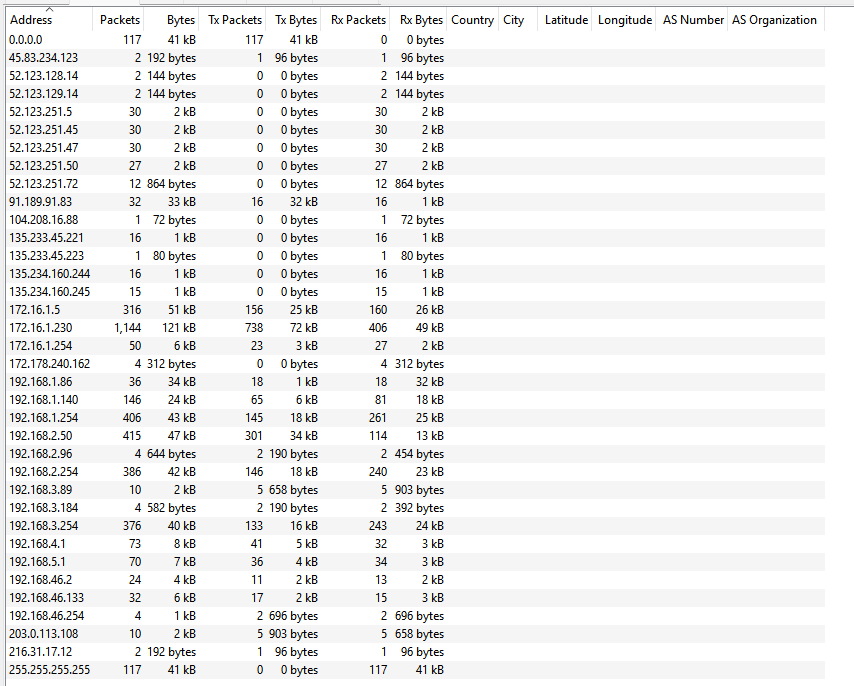
MAC: 00:0c:29:77:42:f6

Let’s fucking go, we’re close. Maybe it’s just… wait a second, did those two routers receive configs from the ftp server? Just 5.1 did, so that’s not it. Maybe it’s just all the private network gateways?
Adding 192.168.1.254 made it wrong so I guess not and 192.168.4.1 shares a MAC with it. 172.16.1.254 also makes it wrong and that one shares with 192.168.2.254