Welcome to my Homelab!
Hello everyone and welcome to my take on the obligatory building a cybersecurity lab series! Even though I do feel like this is a very common thing to constantly see from people there’s a good reason for it. Building a homelab is great practice for a ton of different basic IT skills and security engineering. One of the differences I hope to make apparent is that a lot of tutorials are (almost) all virtualized. Now of course I will be utilizing virtualization as that’s how life works I actually will be running a lot of my services also bare metal with the intention of it working long term. What does that mean? I’m not just building a lab with a firewall to separate a vulnerable machine from some Kali virtual box and then doing some metasploiting we will actually be doing like a SOHO security deployment and making sure it not only works and is sustainable. We will also be doing our best to follow security best practices while considering usability for our users. As I am married, if we have any prolonged network downtime we will have some very upset customers and so I like to think this is a vey realistic simulation. So with that being said let’s get into it and start planning out our deployment.
Network Map and Draft Layout
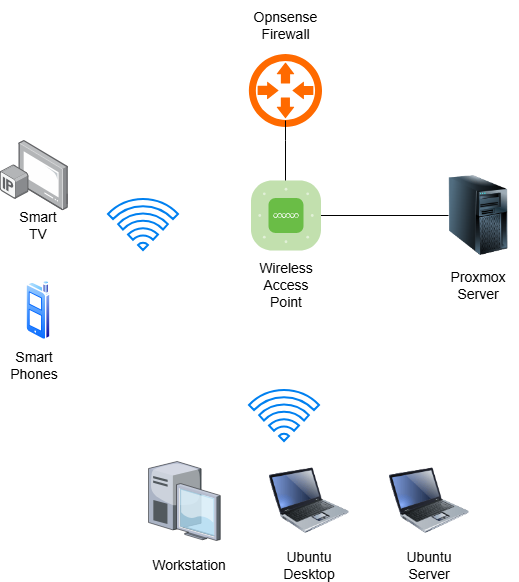 And here we have my home network (more or less) with all of the relevant devices.
| Device | IP Address | Intended Services |
|---|---|---|
| OPNsense Box | 192.168.50.1 |
Well, our Opnsense firewall. Running Unbound DNS, WireGuard, Suricata IDS/IPS and an internal CA/PKI |
| Wi-Fi AP | 192.168.50.2 |
Our wifi access point |
| Proxmox Server | 192.168.50.50 |
Proxmox Server |
| Security Onion VM | 192.168.50.51 |
Security Onion |
| Shuffle VM | 192.168.50.52 |
Shuffle SOAR |
| Windows Desktop | 192.168.50.100 |
Our Windows Workstation |
| RE/Security VM | 192.168.50.101 |
Future VM running on our Workstation for testing |
| Ubuntu Desktop | 192.168.50.151 |
Obsidian LiveSync/CouchDB, Prometheus, Grafana, Uptime Kuma, FleetMDM |
| Ubuntu Server | 192.168.50.166 |
Jellyfin, Nextcloud, Authentik, Restic |
Here is our IP addressing scheme and all the services we’ll have running by the end of this. There will be a few other endpoints on our network, such as the phones and smart TV, but we’ll use DHCP for those and frankly isn’t relevant for right now. We’ll do some network discovery scanning later on anyhow. Another thing I wanna preface this series with is as the Proxmox and Opnsense are bare metal installs, I won’t be walking through the installation. At then end of this post I will have links to the walkthroughs I ended up using, but it’s also pretty straightforward. Like I said though links for that at the bottom. I’ll also link a walkthrough for Obisidan Livesync/CouchDB, because I’ve had this running for a while. We’ll touch on it when we’re integrating it with other services, but I’ll also link that. Now you may also notice in the diagram I have no VLANs configured and there’s some reasons for that. First major one, as mentioned my user likes to cast things to our smart TV. Now, I understand Opnsense and other enterprise solutions do have features to allow multicast traffic through network segments so skill issue on my part. Second is that frankly I just don’t feel like messing with that for right now. So I could change my mind and we might configure that later, but I’m not hyper concerned with that. You might say, well just keep your IoT and mobile devices on the one VLAN and production services on another and yeah great idea… moving on. There will be a VLAN configured later for quarantining purposes when we get more into the security engineering and automation pieces (way) later on, but we’ll talk about that more when we get there. I will also say, I am missing a few services I’d like, but I’m running pretty low on compute as it is. I would love to have a directory service running and some AAA service, but you know what for a home network this is a good start. If I can get some more RAM for the Proxmox box we might talk about that, but that probably won’t happen for a while. For those curious about how I got my hands on the compute I do have during these trying times, Facebook Marketplace is in fact a beautiful thing. This whole lab setup is probably around like $3,000 that I’ve spend and most of that was for my Windows workstation as I also game sometimes so that alone was a good chunk of that money. I will get more into specific specs of certain machines as we go, but I wanted to go over a general roadmap of what we’re deploying and where it’s going.
The Security Stuff
Now we have a few applications just to have for fun, mainly the NextCloud and Jellyfin. Everything else is like monitoring/security and why on earth do I have all these security tools? Well, I am currently doing my capstone for my Masters an GA Tech and frankly I need this infrastructure for a more security focused project I will be working on as kinda a part 2 to this series. While this series will go up as I go along that all will come out at once after my project is done and potentially published so stay tuned for that.
Conclusion
So with all this being said, now that we have our roadmap let’s actually get to deploying and configuring all these different applications.