Benchmarking Local Models with a Custom MCP Server
Alright, so in the [[04 - Benchmarking Small Security Models with EvidenceForge|last part of this project]] we evaluated how well four small local models could analyze a prepared packet of security telemetry. They all performed alright. Some did better than others, but overall nothing was too offensive. However, these models need to demonstrate one more important ability before we can use them for this project: calling tools.
That is where the Model Context Protocol, or MCP, comes in. Rather than us dumping an entire telemetry set into a prompt, I built a read-only MCP server that gives a model a small set of structured search tools. The model can ask for an overview of the data, query a specific evidence source, and supply filters such as a hostname, username, IP address, port, time range, or keyword.
Now, this section we’re working on here is actually more benchmarking, specifically to make sure these models can actually properly leverage MCP. The models need to be able to construct proper queries that can be passed to the MCP tools so that they can, well, actually query telemetry data. So for now we’re just concerned with making sure that they can call all the tools properly.
That sounds simple. It was not quite as simple as I expected.
So Why Build a Custom MCP Server?
Uh, short answer? Because I didn’t realize that Security Onion’s MCP server is only available with their licensed version. Which, totally fair. However, this does force me to create a workaround, where I have Security Onion export logs to another host, in this case, the host where my MCP server is being hosted. For our testing today though, we’re still leveraging the telemetry we created with EvidenceForge.
The EvidenceForge scenario used in my earlier test produced 1,446 records across eight sources:
| Evidence source | Records |
|---|---|
| Bash history | 3 |
| Endpoint events | 477 |
| Syslog | 388 |
| Web access logs | 96 |
| Zeek connections | 347 |
| Zeek DNS | 37 |
| Zeek HTTP | 50 |
| Zeek TLS | 48 |
| Total | 1,446 |
That is not a lot of telemetry by SIEM standards, but it is way too much to paste into a model running with only a 4,096-token context window. MCP does not make that context window any larger. What it does is let the model request a smaller and more relevant slice of the available evidence. Granted it applies the right filters when it queries the data.
I imported the generated telemetry into DuckDB (a Python library that lets you do lots of cool database things, but we’re using to make and query SQL databases) and exposed nine read-only MCP tools:
get_evidence_overviewsearch_syslogsearch_endpoint_eventssearch_connectionssearch_dnssearch_httpsearch_tlssearch_web_accesssearch_shell_history
The overview tool reports the available sources, record counts, time ranges, and observed hosts. The other eight tools search one evidence source at a time. Like I mentioned earlier all these tools use SQL, validate argument types, require timezone-aware timestamps, cap results at 100 rows, and return structured metadata alongside the matching events.
The server runs as a local stdio subprocess on the same machine as the model and benchmark client. These tools all leverage preconstructed SQL queries, so the model is not writing raw SQL or anything, it is merely supplying arguments that are used in the queries. The model is also not able to write or execute any kind of commands through the MCP server.
This matters because I want the model to retrieve evidence through a defined interface, not have unrestricted access to the host and hope it behaves itself.
Testing the Server Before Testing the Models
Before plugging a model into this thing, I tested the MCP path on its own. Otherwise, a broken schema or query function could look like a model failure.
The smoke_test.py file launches the MCP server, discovers the live tools, queries every evidence source, deliberately submits invalid arguments, and then sends another valid request to make sure the server recovers. When tested on the server it discovered all nine tools, reported all eight evidence sources and 1,446 records, and returned one row from each search tool.
It also rejected the inputs it was supposed to reject, including:
limit=0;- boolean and string values supplied where an integer was required;
- a timestamp without a timezone; and
- a request above the 100-row cap.
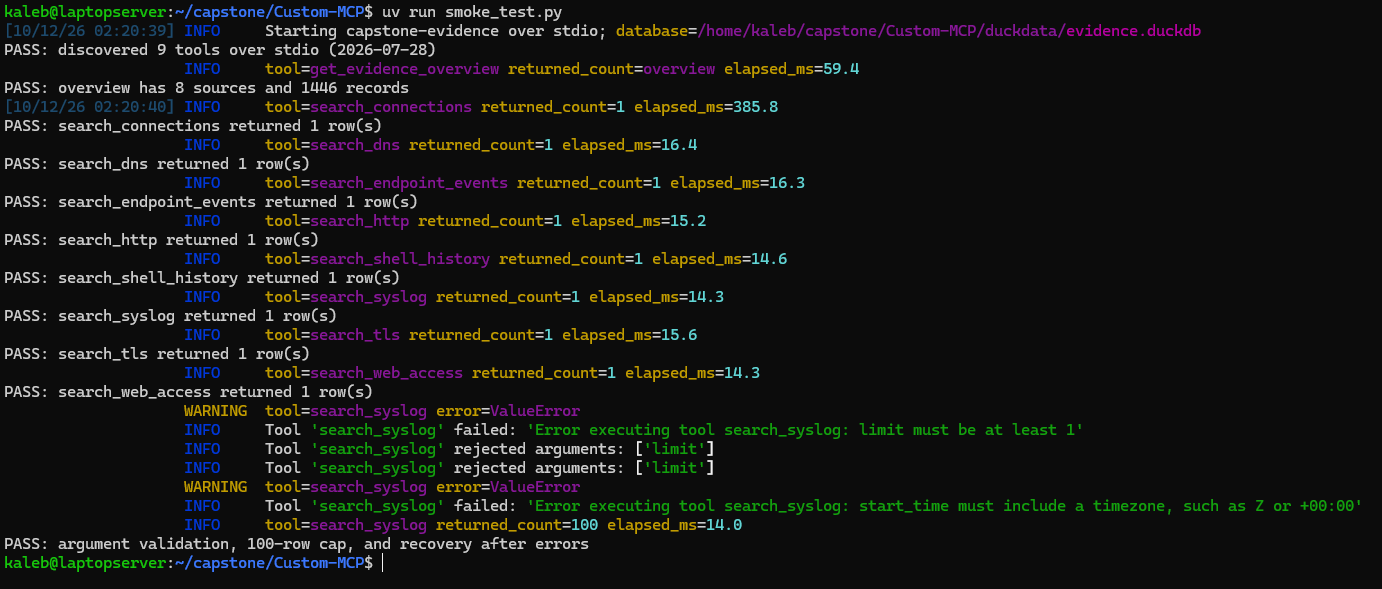
After those deliberate errors, a valid request still worked and the server enforced the row cap. This is all good information to have because if we have issues later, we can be more confident it was an issue on the model’s end, rather than my sleep-deprived, fugue state code.
I also added a model-free preflight to the benchmark harness:
uv run --locked tool_call_bench.py --check
The preflight discovers the live schemas and sends the expected benchmark calls directly through MCP. The final v2 preflight accepted all 12 expected positive calls. No LLM inference happens during this check.

How the Benchmark Worked
The benchmark suite contained 13 cases: 12 requests that required a tool and one request that should be answered without calling a tool. The tool cases covered the overview plus each evidence source, numeric and named DNS response codes, a false boolean value, and a timezone-aware search window.
Each case started a fresh conversation. The model received a system message, a user request, and three predetermined live MCP tool schemas. I kept the candidate order fixed across models. Offering three tools instead of all nine made this a controlled baseline for tool selection rather than a full test of autonomous source discovery.
The shared request settings were:
| Setting | Value |
|---|---|
| Context window | 4,096 tokens |
| Maximum generation | 512 tokens, including reasoning |
| Temperature | 0 |
| Seed | 42 |
| Tool choice | auto |
| Parallel tool calls | Disabled |
| Streaming | Disabled |
| Prompt caching | Requested disabled |
| Repeats | One per shown run |
A normal run looked like this:
In one terminal window we load our model with llama-server.
./llama-server -hf '<desired model here>' \
-c 4096 -np 1 --jinja   --host 127.0.0.1 \
--port 8001   --reasoning-budget 128
We again cap the overall context to 4,096 tokens and limit the reasoning budget to 128 tokens.
In the other terminal we actually run tool_call_bench.py, pointing it at the socket llama-server is running on.
uv run --locked tool_call_bench.py \
  --label <model you are testing> \
  --base-url http://127.0.0.1:8001
The label flag specifies the name of the directory where the benchmarking results will be stored. It doesn’t load the model, hence why we need to also run llama-server.
For every run, the harness checked three separate things:
- Did the model choose exactly one recognized tool, and was it the expected tool?
- Did it supply the requested argument names, values, and JSON types without inventing extra filters?
- Did the call execute successfully through the real MCP server?
A run would only pass if all three checks passed. The no-tool case required a nonempty normal answer and no tool call.
I kept those checks separate because running a successful query is not the same as a correct request. A search can be valid SQL, return rows, and still answer the wrong question. The benchmark output saved the exact request, API response, parsed call, MCP result, timing, and aggregate summary for each run.
Again, to reiterate, this series of testing is solely for measuring tool call reliability. I am not yet interested in the cumulative ability of these models to conduct a full blown security investigation using these tools.
The First Problem: A DNS Argument That Looked Correct
The model we first tested was Qwen 3.5 with version 1 of the benchmark script and it did fairly well, passing 11 of the 12 cases. It selected the correct tool for every positive case and every call executed, but the numeric DNS test failed argument scoring.
The expected arguments were:
{"response_code": 3, "limit": 3}
The API returned:
{"response_code": "3", "limit": 3}
The problem was that 3 and "3" triggered different searches. The original response_code field accepted both numbers and text. A number meant “search for this numeric DNS response code,” while text meant “search for this response-code name.” So 3 searched for numeric code 3, but "3" searched the name field for the text 3.
The server accepted the call, but it searched the wrong field and returned zero rows. I recorded it as a failure because it did not perform the requested numeric search.
To investigate, I replayed the saved request twice. Turning off explicit tool-call parsing did not change the API output. Changing response_code to accept only an integer or null produced the correct numeric argument. The llama.cpp source also showed that its Qwen parser used string parsing when the field’s schema allowed strings.
That meant I could not confidently blame the model itself for the quotes. The schema and serving parser also affected how the argument reached the server. I fixed the ambiguity by giving numbers and names separate fields:
-
response_codeaccepts a numeric DNS code, such as3. -
response_code_nameaccepts a named code, such asNXDOMAIN.
The server rejects calls that supply both fields, pass a number as quoted text, use a blank name, or provide the wrong data type. I also updated the benchmark script appropriately to version 2, reflecting our additional test case. I kept the original 11/12 result so the notes still show what happened before the fix.
The main takeaway was that reliable tool calling depends on the whole setup: the model, prompt template, tool schema, serving runtime, parser, and server validation. A model supporting tools does not guarantee that every part of that setup will handle its calls correctly.
Results
Here are the final full-suite v2 results:
| Model and condition | Overall pass | Positive cases | Correct tool | Correct arguments | Executed | No-tool | Mean model request time |
|---|---|---|---|---|---|---|---|
| Qwen 3.5 9B | 13/13 (100.0%) | 12/12 | 12/12 | 12/12 | 12/12 | 1/1 | 21.20 s |
| Granite 4.2 8B | 13/13 (100.0%) | 12/12 | 12/12 | 12/12 | 12/12 | 1/1 | 14.00 s |
| Ministral 3 8B | 12/13 (92.3%) | 11/12 | 12/12 | 11/12 | 12/12 | 1/1 | 5.00 s |
| Foundation-Sec 8B with custom template | 2/13 (15.4%) | 1/12 | 3/12 | 1/12 | 3/12 | 1/1 | 6.85 s |
All four completed conditions had zero HTTP/setup errors, zero context blocks, and no responses that hit the global generation limit. The Foundation-Sec number in this table is from the custom-template experiment discussed below. Its original serving-template run is a separate compatibility condition and should not be combined with this one.
The mean time is the wall time of the HTTP completion request. It does not include the later MCP execution or prompt-count request, and it is not a normalized tokens-per-second measurement. The models also produced different amounts of reasoning and output. I treat these timings as observations from my setup, not a universal performance ranking.
Qwen 3.5 9B
After the DNS interface was split into separate numeric and named fields, Qwen passed all 13 v2 cases. It selected the correct tool, preserved every requested filter and JSON type, executed all 12 positive calls, and correctly avoided a tool call on the final case.
This was the cleanest result I could have asked for functionally. It was also the slowest completed v2 run at a mean of 21.20 seconds per model request, but it is also the largest model we are testing so that is to be expected to some extent.
Qwen’s result makes it a strong candidate for the eventual agent loop, especially because it also produced the best completed investigation in my earlier EvidenceForge reasoning test. The tradeoff on this hardware is latency. That may be acceptable for analyst-in-the-loop investigation work, but it is worth measuring again once the complete workflow exists.
Granite 4.2 8B
Granite also passed 13/13. Functionally, it matched Qwen on this suite while averaging 14.00 seconds per request. Its request time was lower than Qwen’s on every corresponding case in the recorded runs.
For this particular baseline, Granite had the best balance of correctness and observed response time. I am being careful with that wording because the suite is small and the timing is not hardware normalized. Still, Granite did everything the interface asked it to do and did it faster than Qwen in this test.
This result was also interesting next to the earlier reasoning benchmark. Granite’s tool use was precise, but its security analysis changed substantially depending on how many tokens we allowed the model to use for reasoning.
Ministral 3 8B
Ministral was by far the fastest of the three generally successful models, averaging 5.00 seconds per request. It selected and executed the correct tool in all 12 positive cases. It failed one case because the argument set did not match the request.
The endpoint prompt requested:
{
  "hostname": "WEB-01",
  "principal": "www-data",
  "object_type": "PROCESS",
  "keyword": "/bin/sh",
  "limit": 3
}
Ministral instead sent:
{
  "hostname": "WEB-01",
  "principal": "www-data",
  "object_type": "PROCESS",
  "start_time": "2023-01-01T00:00:00Z",
  "end_time": "2023-12-31T23:59:59Z",
  "limit": 3
}
It omitted the requested /bin/sh keyword and invented a 2023 time range. The MCP server accepted and executed the call because those are valid optional filters. The benchmark still failed it because it searched different evidence than the user requested.
Foundation-Sec 8B
Foundation-Sec required much more diagnosis than the other models.
Its original v2 run scored 1/13, with only the no-tool case passing. At first, I was honestly kind of horrified, but upon further examination the saved input counts were only 126 to 157 tokens, far smaller than prompts containing three complete tool schemas should have been. The server properties also reported that tools and tool calls were unsupported.
Reviewing the output of that test run confirmed the problem: the serving template included the system and user messages but omitted the supplied function definitions. So Foundation-Sec had not actually been given the tools it was supposed to choose between. Alright, wasn’t Foundation-Sec’s fault, let’s try to fix that.
So I updated the benchmark preflight so it renders the prompt and verifies that the tool names are visible before inference. If a template drops them, the run now stops as a setup error instead of charging the failure to the model.
I also built a custom compatibility template specifically for Foundation-Sec that rendered the complete schemas and described a generic <toolcall> JSON format. This was my own experiment, not an official publisher-provided tool template. Local rendering and parser checks passed before I ran the model.
So after all that tinkering it would be great to say that fixed it. However, this only improved the model’s performance slightly: 2/13 overall. The overview and no-tool cases passed. Three positive cases produced recognized tool decisions and executed, but only the no-argument overview had the correct argument set. Two executable searches omitted explicitly requested filters, while most of the remaining cases failed to produce the expected single structured call.
In a smaller more customized run, Foundation-Sec was able to generate ordinary JSON text containing the correct function and arguments for two failed cases, but the API did not return those as structured tool_calls. At this point, I had already spent a fair amount of time trying to get Foundation-Sec to behave and I didn’t want to continue giving it special treatment in an attempt to get it to perform tasks other models had no issues with. Hence the final score for Foundation-Sec remaining at 2/13.
Now with that being said and in all fairness to Foundation-Sec, this is still a perfectly capable model for security tasks. It just highlights what can happen sometimes with these “specialist” models. As Foundation-Sec is built off of Llama 3.1 8B with a large dataset of security information, it is normal for some of its other capabilities to be potentially degraded.
My Overall Evaluation
For this baseline, Qwen and Granite were the clear functional winners. Both completed every v2 case exactly as requested. Granite did so with lower observed request times, which gives it the best correctness vs latency balance in this specific test. Qwen was slower, but its perfect tool score combined with its stronger earlier EvidenceForge analysis makes it just as difficult to dismiss.
Ministral is the interesting speed option. It was much faster and chose the right tool every time, but the one argument failure was not benign. Invented time bounds and a missing keyword can change the evidence returned without causing an obvious execution error and so I am not comfortable progressing with this model at this time.
Foundation-Sec is not a practical tool-calling candidate under the tested conditions. Its original result exposed a serving-template problem, and the custom template exposed a second problem: seeing the tools did not translate into reliable structured calls with complete filters. This does not prove the model can’t call tools period as with more tinkering it very well could. However, partially in the interest of time and also just general reliability, we can conclude that Foundation-Sec will not be our model of choice in this scenario.
Conclusion
Good lord, okay so, there we finally have it. The custom MCP server worked, our benchmark harness caught failures that otherwise would have probably been missed and three of the four candidate models showed at least reasonably strong tool-selection behavior.
So after doing all of this benchmarking, between this experiment and the EvidenceForge analysis I would like to announce the model we will be going forward with! Drum roll please………… It’s Qwen 3.5. Shocker, I know, but it just performed noticeably better at the security investigation and was very reliable at tool calling so pretty clean victory. So from here on out Qwen will be the only model we are testing with and using.
Now for our next steps here, we’re going to need to start testing all of this with some real telemetry from our Security Onion instance. So we need to figure out how we’re going to export the relevant information from Security Onion, get it somewhere our MCP server can access and then see what Qwen can reason from all that. Once we have that going we can potentially pivot to emulating some adversarial behavior on my local network and seeing if Qwen can pick that up or not. Context is going to be the biggest limitation here so, let’s see how that goes next time. Thank you for trudging through this monster of a post and I will talk to you here soon!