Exporting Security Onion Telemetry for Local Model Analysis
Introduction
Hello once again everyone! Over the course of the last few posts, we’ve deployed Security Onion and set up a SPAN port in order to give it visibility into our local network. We’ve also been experimenting with local AI, using llama.cpp as our inference engine and we’ve been doing lots of benchmarking. Between security reasoning and calling tools via our custom MCP server, which is where we left off last time. Now we finally get to start gluing all of these different pieces together and actually start working towards our end goal. Autonomous threat hunting and AI-enabled responses to security events.
As for what the pipeline looks like currently for actually getting our telemetry to our MCP server, that process kinda looks like this:
Security Onion
    -> timestamped NDJSON snapshot
    -> SCP transfer
    -> snapshot-specific DuckDB database
    -> read-only MCP tools
    -> local model
So just as a reminder, we needed to develop our own MCP server to act as a proxy for our model to be able to actually access the telemetry. Security Onion does have an MCP server natively, but as is the case with most enterprise SIEM solutions, it is behind their Pro (licensed) tier. As I don’t need an enterprise license to work on a three month long project I needed an alternative. So here we are.
Now luckily getting telemetry exported out of Security Onion isn’t too terrible of a process and honestly there’s probably an easier way to do it than what I did, but what I did worked well enough. We’ll get more into the specifics shortly, but we were able to use a tool on the CLI to help us query and save us snapshots of the telemetry I was interested in. From there we could just scp the created files over to the MCP server, use our scripts we created in previous posts to create database files with DuckDB and then give our model the ability to query that database. Yeah, again, there’s probably better solutions to what I’m trying to do here… And yeah, that’s kinda that. Okay well, without further prefacing let’s actually start getting some logs over to our MCP server yeah?
So, What Exactly Are We Exporting?
Okay, so Security Onion stores most of its data in Elasticsearch data streams. For now, I just decided to care about four of them:
| Source | Security Onion data stream | What I want from it |
|---|---|---|
| Endpoint | logs-endpoint.events.*-default |
Process, file, registry, API, security, DNS, and network activity from Elastic Agent |
| Zeek | logs-zeek-so |
Connection, DNS, HTTP and TLS metadata |
| Suricata | logs-suricata.alerts-so |
Signature alerts and the fields needed to correlate them with network flows |
| Detections | logs-detections.alerts-so |
Any Security Onion or Elastic detections |
Now, as briefly mentioned earlier, Security Onion includes a command-line utility named so-elasticsearch-query. It makes querying the underlying Elasticsearch data a little easier from the Security Onion host. That is definitely an oversimplification, but it is good enough for what we are doing here. The response is still ordinary Elasticsearch JSON: execution metadata, hit counts, and the matching documents under hits.hits.
I started by proving I could at least export endpoint events for one host and a short time range:
sudo so-elasticsearch-query \
  'logs-endpoint.events.process-default,logs-endpoint.events.network-default/_search' \
  -X POST -d '{
    "size": 10000,
    "track_total_hits": true,
    "sort": [{"@timestamp": "asc"}],
    "query": {
      "bool": {
        "filter": [
          {"term": {"host.name": "kalebs-desktop"}},
          {"range": {"@timestamp": {
            "gte": "2026-10-17T05:00:00Z",
            "lt": "2026-10-17T05:08:00Z"
          }}}
        ]
      }
    }
  }' > ~/telemetry-export/endpoint-response.json
The raw response here is useful for checking Elasticsearch’s result metadata, but it is not the format I want to transfer and ingest. So I converted it to newline-delimited JSON (NDJSON), with one event per line, while preserving the original index, document ID, and source document:
jq -c '
  if .error or .timed_out or (._shards.failed > 0)
     or (.hits.total.relation != "eq")
     or ((.hits.hits | length) != .hits.total.value)
  then error("Export incomplete: inspect the response; pagination may be required.")
  else .hits.hits[] | {_index, _id, _source}
  end
' ~/telemetry-export/endpoint-response.json \
  > ~/telemetry-export/endpoint.ndjson.part &&
mv ~/telemetry-export/endpoint.ndjson.part \
   ~/telemetry-export/endpoint.ndjson
This command also performs some validation for us. In case a shard fails, the total is inexact, or the response contains fewer hits than Elasticsearch says exist, jq stops instead of quietly producing a partial export. The temporary .part file also keeps an interrupted command from looking like a completed snapshot.
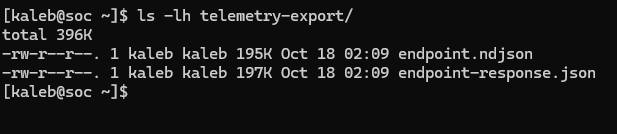
Cool, we have host telemetry. It was also immediately obvious that manually building a separate query for every data source would get real tedious real quick. So I took a quick detour to fix that to make subsequent test runs a little less painful.
Turning the Query into a Repeatable Snapshot
After about two days of constructing the end-to-end pipeline and doing a lot more development work than I originally expected, I finally had something halfway decent. I wrapped the export process in a bash script (/home/kaleb/export_snapshot.sh) on the Security Onion host. The script accepts an explicit UTC start time, UTC end time, and output directory. It then exports endpoint, Zeek, Suricata, and detection documents for the same window.
The main part of the script uses so-elasticsearch-query to request each source for the same time frame. The rest is mostly validation, normalization, and formatting before saving everything into one timestamped directory. Nothing too fancy.
The invocation looks like this:
/home/kaleb/export_snapshot.sh \
  --start 2026-10-20T01:30:00Z \
  --end 2026-10-20T02:00:00Z \
  --output /home/kaleb/telemetry-export/snapshots/20261020T013000Z_20261020T020000Z
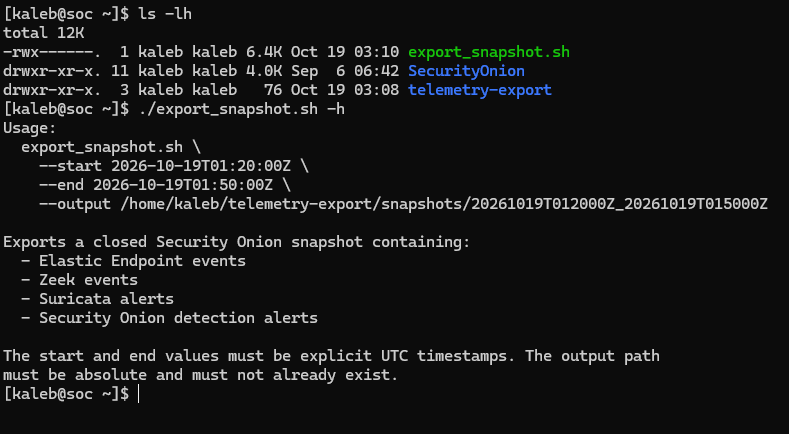
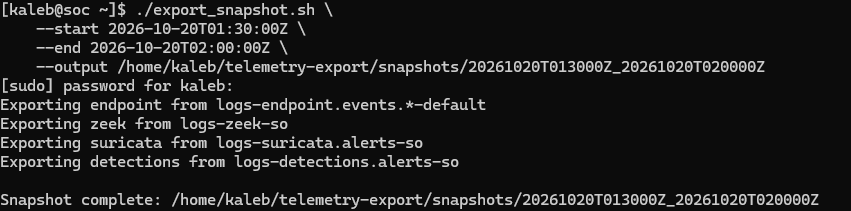
Ta da! Perfect, now we have a bunch of telemetry saved off and all we need to do is just ship it over to the MCP server.
Transferring the Snapshot to the MCP Server
Now for the easy part. I copy the complete snapshot directory over SSH with scp. Again, nothing too fancy:
scp -r \
  /home/kaleb/telemetry-export/snapshots/20261020T013000Z_20261020T020000Z \
  kaleb@<MCP_SERVER_IP>:/home/kaleb/capstone-data/so/snapshots/
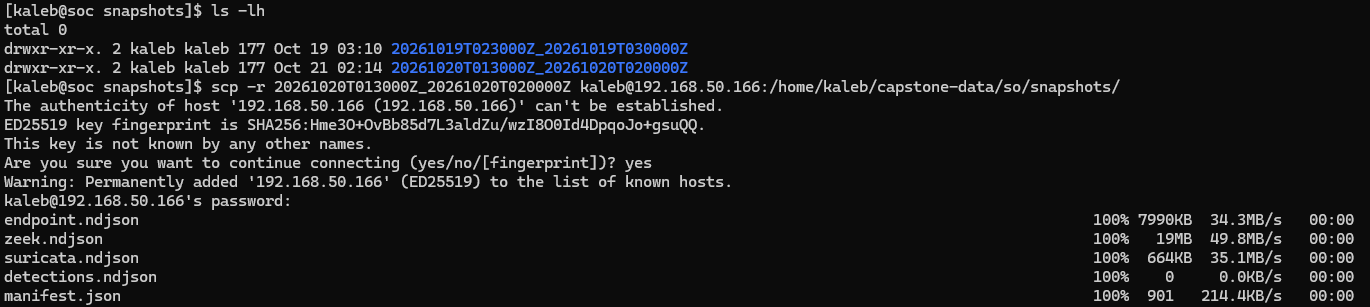

And there it is, awesome.
So for those of you that have been following along with this series, you know I have a git repo for all of the code I’ve been leveraging for this project and any other relevant files. I, however, will not be storing telemetry from my personal home network there, for you know, obvious reasons. I’ve already had pretty bad opsec by not sanitizing a lot of my addressing schemes and whatnot so I’ve already been oversharing as it is. Just for potential future reference though, I will be storing these snapshots in this kinda directory structure.
/home/kaleb/capstone-data/
├── so/
│   └── snapshots/
├── duckdb/
└── poc-results/
While I will not be storing telemetry from my local network in the repo, the models still need the path to access it, so this will be where all of my data lives.
Extracting the Zeek Datasets
Now before we go ahead and instantly try to make a database with this, there are a couple quick fixes we need to do, mainly just for the sake of my script still working. The main fix involves how we saved off our Zeek logs, the bash script saves all Zeek logs to one file, but our Python scripts expect them all saved off into their appropriate sections (connections, DNS, HTTP, and SSL/TLS).
For example, below we just make a directory called zeek/ in the appropriate snapshot directory and then that next command is what does the extraction. Essentially we’re just extracting the content of any event that has the source zeek.conn and saving it to a new file conn.json.
mkdir -p \
  /home/kaleb/capstone-data/so/snapshots/20261020T013000Z_20261020T020000Z/zeek

jq -rc '
  select(._source.event.dataset == "zeek.conn") |
  ._source.message |
  fromjson
' /home/kaleb/capstone-data/so/snapshots/20261020T013000Z_20261020T020000Z/zeek.ndjson \
  > /home/kaleb/capstone-data/so/snapshots/20261020T013000Z_20261020T020000Z/zeek/conn.json
Then I just repeat the same pattern for zeek.dns, zeek.http, and zeek.ssl, writing the results to dns.json, http.json, and ssl.json respectively… I really should just make this part a shell script too at some point. Anyhow, the commands look like this:
jq -rc '
  select(._source.event.dataset == "zeek.dns") |
  ._source.message |
  fromjson
' /home/kaleb/capstone-data/so/snapshots/20261020T013000Z_20261020T020000Z/zeek.ndjson \
  > /home/kaleb/capstone-data/so/snapshots/20261020T013000Z_20261020T020000Z/zeek/dns.json

jq -rc '
  select(._source.event.dataset == "zeek.http") |
  ._source.message |
  fromjson
' /home/kaleb/capstone-data/so/snapshots/20261020T013000Z_20261020T020000Z/zeek.ndjson \
  > /home/kaleb/capstone-data/so/snapshots/20261020T013000Z_20261020T020000Z/zeek/http.json

jq -rc '
  select(._source.event.dataset == "zeek.ssl") |
  ._source.message |
  fromjson
' /home/kaleb/capstone-data/so/snapshots/20261020T013000Z_20261020T020000Z/zeek.ndjson \
  > /home/kaleb/capstone-data/so/snapshots/20261020T013000Z_20261020T020000Z/zeek/ssl.json
And finally after all that…

Cool. Now that that’s taken care of we should be able to move to finally making the telemetry database.
Building the DuckDB Snapshot
If you happened to read my security reasoning benchmarking post, this should look awfully similar. If not that’s fine, let me quick go over what’s about to happen here.
The MCP server does not query those NDJSON files directly. We need to construct the database that will house all of this data and that the local model will eventually query. Luckily, this part is pretty easy now because I have spent way too much time scripting it out. I normalize the snapshot into a new DuckDB database with snapshot_database.py from the MCP repository:
cd /home/kaleb/capstone/Custom-MCP

uv run --locked python snapshot_database.py \
  --snapshot /home/kaleb/capstone-data/so/snapshots/20261020T013000Z_20261020T020000Z \
  --db /home/kaleb/capstone-data/duckdb/20261020T013000Z_20261020T020000Z.duckdb
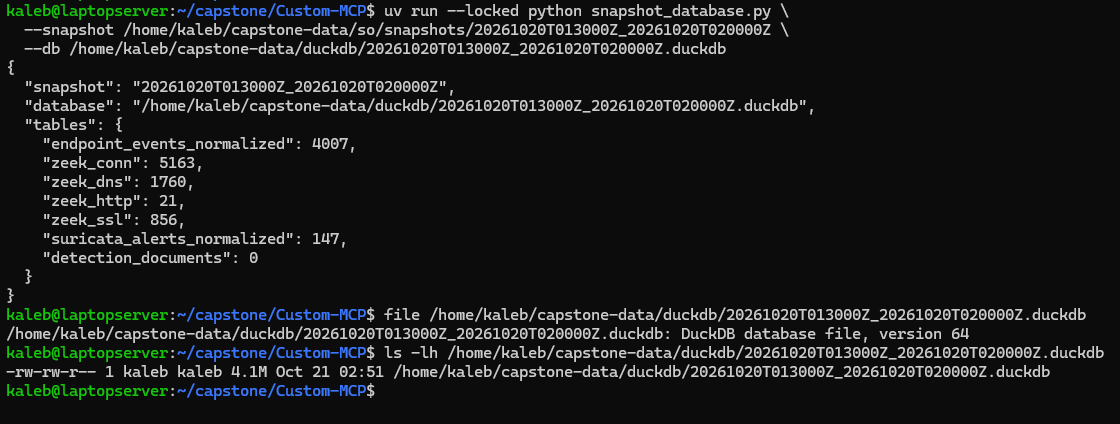
snapshot_database.py is just an updated version of the old database.py script. database.py was made in a way that kinda made it too specific to the EvidenceForge generated telemetry, so I needed to refactor a bit in the form of a whole new script… anyways.
For this snapshot, the database exposed the following number of queryable records:
| Queryable source | Records |
|---|---|
| Endpoint events | 4,007 |
| Suricata alerts | 147 |
| Zeek connections | 5,163 |
| Zeek DNS | 1,760 |
| Zeek HTTP | 21 |
| Zeek SSL/TLS | 856 |
| Detection documents | 0 |
| Queryable total | 11,954 |
So hey that’s pretty cool, almost 12,000 records in just the 30 minute window I pulled from. Now as nifty as that is, that does immediately bring up kinda the core limitation of this entire operation. Which is context limit. As I’ve mentioned in other posts, I am running my local model (Qwen 3.5 9B) on a machine with 6 GB of VRAM. The model does fit inside that with a little bit of room, but between the hardware limitations and this just being a smaller model, we are just not going to have enough room for an in-depth analysis of even like half of this telemetry. With that being said, I try to compensate as best as I can with how I constructed some of the MCP tools, but we won’t truly know how it holds up until we start testing with some live telemetry with some pseudo-malicious behavior sprinkled in there. Speaking of the MCP tools, we should probably verify the tools still populate and function as expected quick.
Verifying the MCP Tools
Okey doke, before allowing our model anywhere near the data, let’s run smoke_test.py against the new database:
cd /home/kaleb/capstone/Custom-MCP

uv run --locked python smoke_test.py \
  --db /home/kaleb/capstone-data/duckdb/20261020T013000Z_20261020T020000Z.duckdb \
  --show-overview
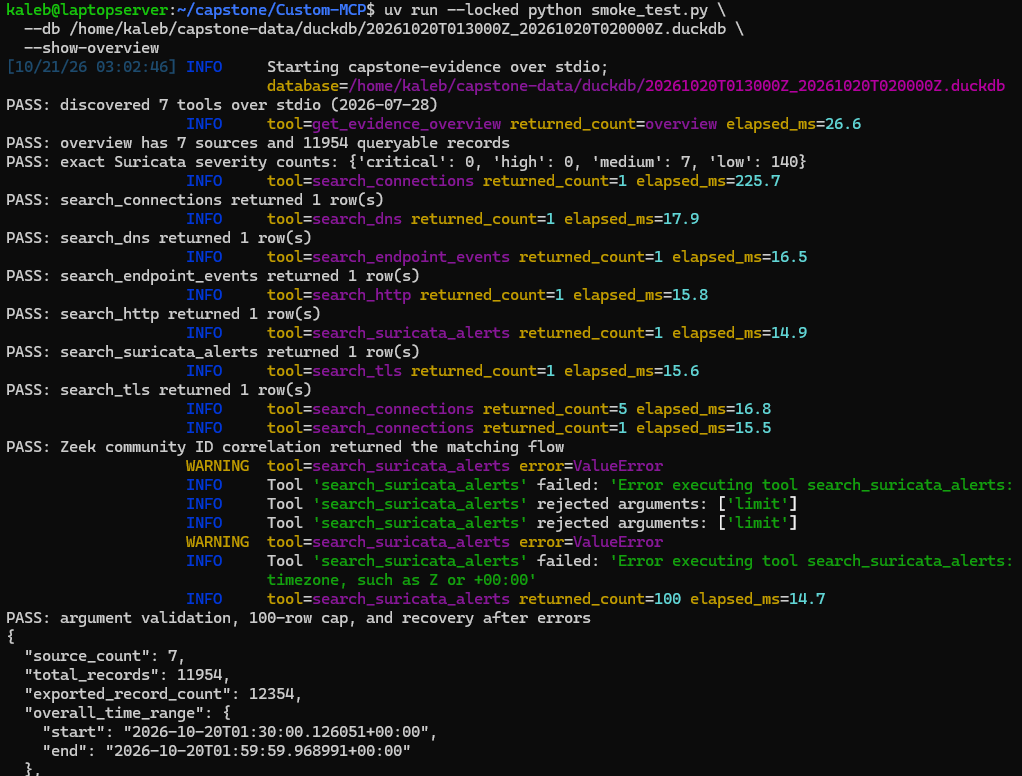
Excellent. The output looks good, so now we know that the MCP server is reading the database properly and all the tools are operating appropriately.
The MCP server exposes seven read-only tools to the model:
get_evidence_overviewsearch_endpoint_eventssearch_connectionssearch_dnssearch_httpsearch_tlssearch_suricata_alerts
Again, for those (very) few who have been following along with this series, you will notice the new Suricata tool, which is another change I made when it came to leveraging EvidenceForge vs Security Onion for telemetry.
How the Model Did with the Snapshot
Once I had all seven tools working, I ran Qwen3.5-9B against this snapshot a few times to see how it would actually investigate the data. This is where things got interesting. Every model-directed tool call across the four development runs passed schema validation and executed successfully. So, mechanically, the model understood how to use the MCP server. Whether it made good investigative decisions with those tools was another matter.
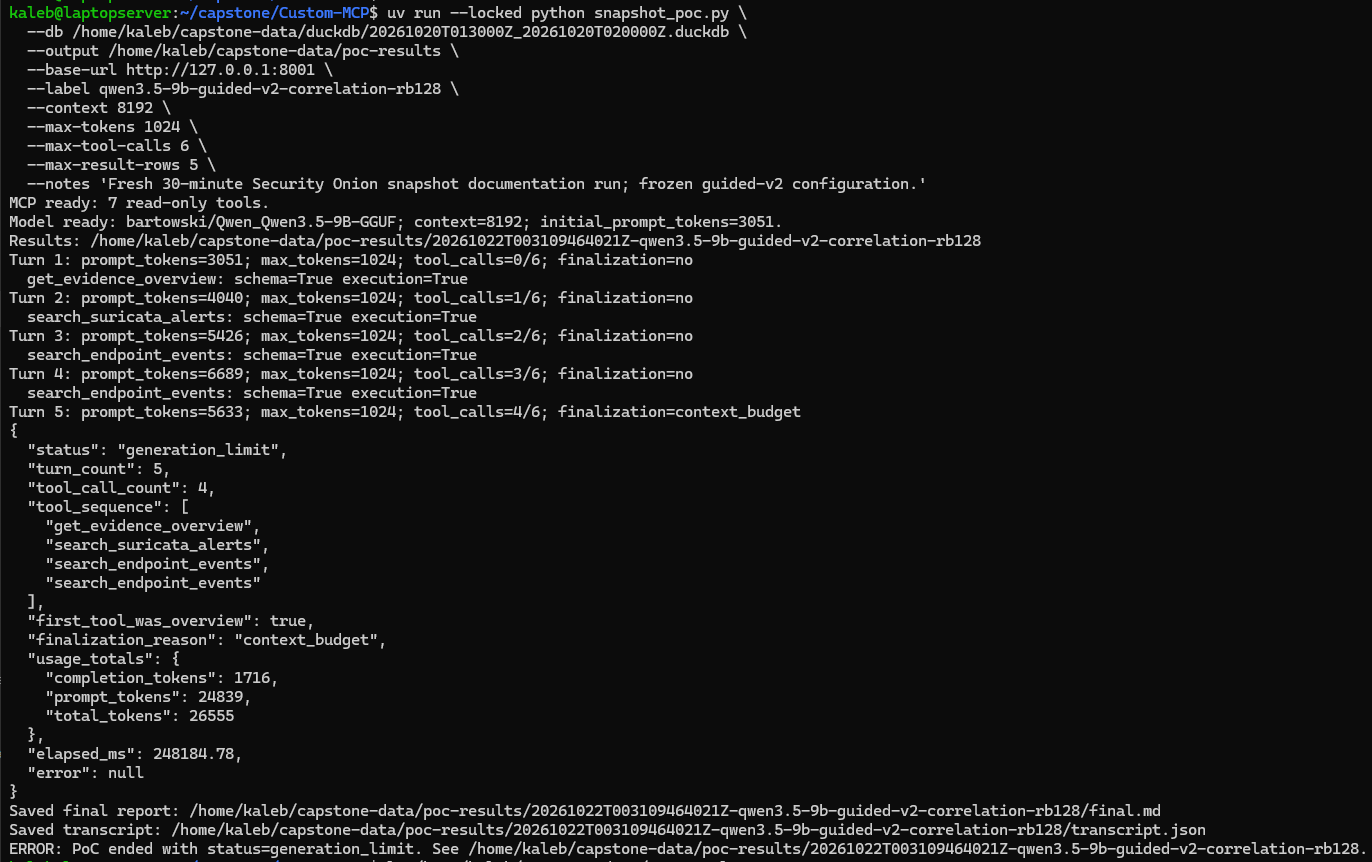
The first run retrieved five of the seven medium-severity alerts and sampled some endpoint events, but it never queried Zeek. The harness eventually forced the investigation to wrap up because it was running out of context, and the final response then hit its generation limit. Even with those gaps, the model claimed that all of the medium alerts correlated with legitimate activity and described Zeek connection patterns it had never actually queried. It also attributed one network connection to brave.exe when the endpoint record identified backgroundTaskHost.exe. So good news was the tools worked, but the analysis was a little more confident than the evidence supported.
For the second run, I lowered the number of rows returned by each search from five to three. That gave the model enough room to use all six of its allowed tool calls, which sounded promising. Instead, it just used most of those calls to retrieve the same small group of Suricata alerts over and over again. Across five alert searches, 11 returned rows represented only three unique alerts. It never moved on to endpoint or Zeek data. So once again, not ideal. We would prefer that the model eventually move forward with the investigation.
So I made some changes to the investigation prompt for the next version and added a repetition guard to stop exact duplicate searches. The next two runs did go a little better. Both completed naturally after four tool calls instead of being forced to stop by the context or tool limits. The model pulled the evidence overview, sampled the medium alerts, checked endpoint activity, and then used a Community ID to correlate a Suricata alert with a Zeek connection. Both runs followed the same tool sequence, produced the same report, and finished in a little over three minutes.
The strongest part of those final runs was the cross-source correlation. The model selected an ET HUNTING Connectivity Check With Go User-Agent alert and found the matching Zeek connection using the exact Community ID. The source and destination addresses, ports, transport, and timestamps all lined up. That is the kind of workflow I built these tools to support, so seeing the model actually perform it was pretty cool.
The final report still was not perfect. The model reviewed only three of the seven medium alerts, and its endpoint search returned a few file events that did not establish which process created the alerted network connection. It disclosed that four medium alerts remained unreviewed, but it still described the observed activity as benign more confidently than I think it should have. Familiar process names and domains can provide a reasonable explanation, but are not proof by themselves.
Conclusion
All in all, I am pretty happy with where this landed. We now have a repeatable path from Security Onion to a snapshot-specific DuckDB database, seven read-only MCP tools, and a local model that can use those tools to investigate real telemetry. Not too shabby, if I say so myself.
However, the real test comes next. Can the model actually pick out and investigate potentially malicious behavior? So now I get to go and write a script that either does some beaconing, maybe some file encryption or just something that might seem a little nefarious. We’ll run it on my host here and see if the model can notice and properly investigate the behavior.
So with all that being said, thank you for somehow sticking through all that with me and I will be back shortly. Talk to you again here soon!
References
- Security Onion documentation: https://docs.securityonion.net/
- Security Onion Elasticsearch documentation: https://docs.securityonion.net/en/3/main/elasticsearch/
- jq manual: https://jqlang.org/manual/
- DuckDB Python API: https://duckdb.org/docs/current/clients/python/overview
- Model Context Protocol tools specification: https://modelcontextprotocol.io/specification/2025-06-18/server/tools