Introduction
Hello everyone and welcome back to another post from yours truly. Today we’re going to be doing something slightly different actually. I’ve been looking more into detection engineering recently and been wanting to get better at writing detection rules in different formats and whatnot. So today we’re going to be actually looking at a threat intelligence post from Cisco Talos covering some malware from the Chaos ransomware group. Specifically, their msaRAT malware that uses the browser for its C2 communications. We’ll get more into that here in a second, but first we’re just going to comb through the blog post, make note of potential IoCs and detectable artifacts and then today we’re going to focus on Sigma rules. In the subsequent post we’ll actually be writing a detection in ClamAV. Now as for verifying the capability of these rules to adequately detect the intended behavior, I will be setting up a sandbox later to try to validate our rules here, so stand by for that. So without further ado, let’s get into this post and figure out what we’re going to try and detect.
Let’s Extract Some IoCs and Find Detection Opportunities
So here is the blog post again, you may want that open as we go through it. So the first thing we notice here is the initial intrusion method is explicitly stated, but it’s implied that it could have been some variation of phishing. So, instead we start out with the attacker running a malicious curl command from an already compromised host.
 A couple things of interest here for later, we see the curl reaching out to a public IP using HTTP over port 443. As the post states, this is a basic attempt to thwart firewalls that just allow traffic based off port number. It downloads the
 update_ms.msi file from the remote server and saves it under C:\ProgramData. Now the post goes into some detail regarding the file and how it extracts the malicious lib.dll and loads it into memory. We will address that more when we are creating our ClamAV rule, but for now we’ll keep combing through the post.
After msaRAT initializes Tokio (an asynchronous runtime for Rust, which msaRAT is written in), it begins scanning the local file system for the installation path of Chrome or Edge. It scans through a few potential directories the executables could exist, before falling back to the registry if it can’t find it. Once the malware finds the file paths it will attempt to launch a browser in headless mode with the following flags set.
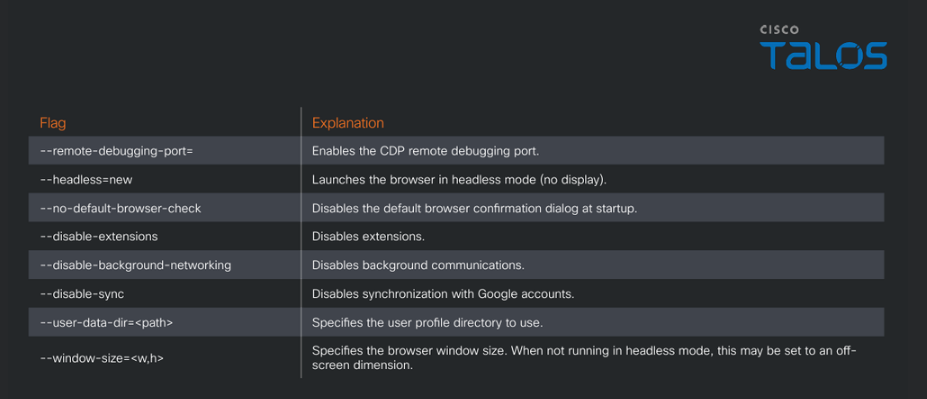 Now these arguments should also make good detectables as well. After this the post delves into the communications of the malware and the nuts and bolts of how that works, could be a good Suricata or Snort rule maybe. Towards the bottom of the post it mentions how the binary also contains a Cloudflare Workers endpoint (“is-01-ast[.]ols-img-12[.]workers[.]dev”) which could potentially be another part of a ClamAV rule.
Alrighty, so that’s our initial passthrough. There honestly could be a plethora of detections I missed in that read through, but this is just what I noticed. Next we’ll get started with drafting our Sigma rules.
Now these arguments should also make good detectables as well. After this the post delves into the communications of the malware and the nuts and bolts of how that works, could be a good Suricata or Snort rule maybe. Towards the bottom of the post it mentions how the binary also contains a Cloudflare Workers endpoint (“is-01-ast[.]ols-img-12[.]workers[.]dev”) which could potentially be another part of a ClamAV rule.
Alrighty, so that’s our initial passthrough. There honestly could be a plethora of detections I missed in that read through, but this is just what I noticed. Next we’ll get started with drafting our Sigma rules.
Writing our Sigma Rules
What is Sigma
So Sigma is interesting and I’m not sure I can explain it better than the official About Sigma page, but I’ll give it my go. Sigma is a detection format/syntax for, well detecting malicious behavior. It’s kinda like your Suricata rules and your YARA rules, but it’s specifically for log files. More specifically, using the sigma-cli tool you can take a Sigma rule and create queries for pretty much any SIEM platform you can think of. So that’s pretty cool and there’s lots of Sigma rules already out there to learn from and reference for your learning. Sigma rules are stored within .yml files by the way, important note. If you want to learn a little more you can read the link above, but we’re going to start digging into making our first Sigma rules!
Our Template Rule
Again, I took this from the official Getting Started page for Sigma. This is a rule that just fires off whenever it sees any of the listed EventIDs in Windows Defender logs.
title: Windows Defender Threat Detection Disabled
logsource:
    # Windows Defender
    product: windows
    service: windefend
detection:
    selection:
        # The detection itself
        EventID:
            - 5001
            - 5010
            - 5012
            - 5101
    condition: selection
We’ll have this here, just to kinda reference as we craft our Sigma rules for msaRAT. So, let’s start off first with trying to detect the initial curl command the attackers fire off to download the malicious .msi file.
Detecting the Malicious Curl
We’re going to start off with adding some contextual data to our rule, before getting into building the actual detections.
title: Curl Downloading MSI Over Plain HTTP Port 443 to ProgramData
status: test
description: Attempt at detecting msaRAT. Curl attempts to reach out to a plain http server being hosted on port 443 in an attempt to bypass firewall rules.
references:
    - https://blog.talosintelligence.com/chaos-msarat-living-off-the-browser-to-build-covert-c2-channel/
logsource:
    product: windows
    category: process_creation
detection:
    selection:
        # The detection itself
        EventID:
            - 5001
            - 5010
            - 5012
            - 5101
    condition: selection
Alrighty, so I filled in some information all the way up to the actual detection logic. First we gave our rule a descriptive title. Then, I set the status to test because we are definitely still testing this rule and it is not complete by any stretch of the imagination. Gave it a pretty good description there, although this rule could detect more than just msaRAT because http over port 443 is weird no matter how you slice it. Under references I link to our Talos blog post I got this information from. Finally there under logsource I specify that this detection is for a Windows machine and the category is process_creation as curl will be spawned from whatever invokes it.
title: Curl Downloading MSI Over Plain HTTP Port 443 to ProgramData
status: test
description: Attempt at detecting msaRAT. Curl attempts to reach out to a plain http server being hosted on port 443 in an attempt to bypass firewall rules.
references:
    - https://blog.talosintelligence.com/chaos-msarat-living-off-the-browser-to-build-covert-c2-channel/
logsource:
    product: windows
    category: process_creation
detection:
  selection_image:
    Image|endswith: '\curl.exe'

  selection_command:
    CommandLine|contains|all:
      - 'http://'
      - ':443/'
      - '.msi'
      - '\programdata\'

  condition: selection_image and selection_command
falsepositives:
  - Potential administrative automation downloading MSI packages into ProgramData from an HTTP service explicitly configured on port 443.
level: high
Okay so let’s get into how this detection actually works. Under detection: we have two different selections. Selections in Sigma are essentially what the rule is trying to detect. As we have two selections here we name them selection_imageand selection_command respectively. you can name them whatever you prefer as long as it’s uniform. The first selection is trying to detect a Windows process that ends with \curl.exe, which tracks as we are trying to find a specific curl command. However, that is very broad and if anyone tries using curl on a Windows system that would be detected, hence our second selection. selection_command states there that we are looking for a command that contains all of those criteria. A curl request via HTTP, over port 443, downloading an .msi file and saving it to C:\ProgramData. The condition statement there specifies that this is detected when both selections are satisfied, so a curl command executed with all of our criteria as a part of the command. So with that being said, we have this falsepositives section where we can put scenarios where this activity could be a false positive. Now a more seasoned detection engineer than I may think of some better scenarios, but for me I have trouble of thinking of one. Unless someone is doing the weirdest admin work on the planet I think this is pretty suspicious. Hence the level rating being high as honestly if I see plain http over port 443 that already doesn’t make me feel great.
One thing you could say is that this rule is pretty narrow as if the attacker just changes the port or something then this rule fails or if they change the installation directory. Remember defense in depth though, the reason the attackers chose 443 is to try and evade basic firewall ACLs and .msi files being stored in C:\ProgramData may not trip EDR, so it isn’t quite that simple, but I think the critique still stands. For our first Sigma rule though, I’m content, let’s get working on the rule for detecting the Headless Browser launch.
Detecting When Headless Browser is Launched
Like before let’s fill in some of our contextual information first.
title: Chrome or Edge Launched Headless With Remote Debugging
status: test
description: Detection for when a process spawns Chrome or Edge in headless mode and is attempting to enable CDP.
references:
    - https://blog.talosintelligence.com/chaos-msarat-living-off-the-browser-to-build-covert-c2-channel/
logsource:
    product: windows
    category: process_creation
Alright, now it is time for our actual detection logic.
detection:
  selection_image:
    Image|endswith:
      - '\chrome.exe'
      - '\msedge.exe'

  selection_flags:
    CommandLine|contains|all:
      - '--remote-debugging-port='
      - '--headless=new'
      - '--user-data-dir='

  condition: selection_image and selection_flags
falsepositives:
  - Legitimate browser automation using Chrome DevTools Protocol (CDP)
level: medium
Alright here is our completed rule!
title: Chrome or Edge Launched Headless With Remote Debugging
status: test
description: Detection for when a process spawns Chrome or Edge in headless mode and is attempting to enable CDP.
references:
    - https://blog.talosintelligence.com/chaos-msarat-living-off-the-browser-to-build-covert-c2-channel/
logsource:
    product: windows
    category: process_creation
detection:
  selection_image:
    Image|endswith:
      - '\chrome.exe'
      - '\msedge.exe'

  selection_flags:
    CommandLine|contains|all:
      - '--remote-debugging-port='
      - '--headless=new'
      - '--user-data-dir='

  condition: selection_image and selection_flags
falsepositives:
  - Legitimate browser automation using Chrome DevTools Protocol (CDP)
level: medium
So to break down the detection logic of this rule a little bit, we’re looking now for a process that ends with \chrome.exe or \msedge.exe so that’s our first selection requirement. Now under selection_flags we have the three unique options. I did not choose all 8 flags the attacker used, because they could just remove one and the rule fails. So, we only choose the 3 defining characteristics that make this technique unique. Like our last rule, this rule only fires if selection_image and selection_flags are matched. Now for falsepositives and level I am a little more nervous about these. There are instances legitimate administrative tasks could leverage this utility (via like scripts or something) so this one’s going to be a medium, maybe even low to be honest, but my naivety tells me to keep it at medium. This is why testing is important, if it turns out the sys admins have a script doing some automation I don’t want to flood the SIEM with alerts that are a higher level than they should be because I didn’t know better. Any who, we’ve officially made two Sigma rules to try and detect msaRAT! Yay, grab a cup of coffee or something, you earned it!